
Access to the Cyberimpact SMTP service varies depending on the user type and the plan status on your account. This article explains who can access what, and how to grant or restrict access for a team member.
What it's used for
Understanding SMTP service permissions allows you to:
- Know what you can do based on your role on the account
- Grant access to the right people on your team
- Understand why certain sections may be hidden or inaccessible for some users
How it works
Access to the SMTP service varies based on your role on the account.
Permissions by user type
| Role | Dashboard | Domains | Activity | Pricing |
|---|---|---|---|---|
| Administrator | ✔ | ✔ | ✔ | ✔ Full access, including the plan request form |
| Regular user | ✔ | ✘ | ✔ | ✔ Can view plans, but cannot submit a change request |
| Custom permissions user (without permission) | ✔ Without activity data | ✘ | ✘ | ✔ Can view plans, but cannot submit a change request |
| Custom permissions user (with Access SMTP activities permission) | ✔ | ✘ | ✔ | ✔ Can view plans, but cannot submit a change request |
Why is the Domains tab restricted?
The Domains tab provides access to DNS configurations, authentication records, and SMTP credentials — sensitive information that allows emails to be sent on behalf of your domain. For this reason, only account administrators have access to it.
Granting SMTP access to a user with custom permissions
Only an account administrator can manage the permissions of other users.
- Log in to your Cyberimpact account as an administrator.
- Go to account settings and configurations and select the Users section.
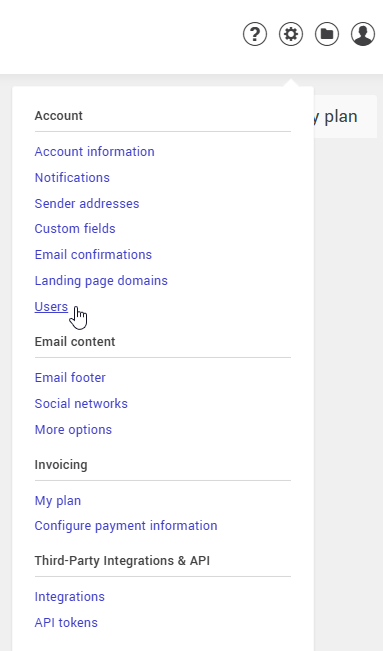
- Select the action menu of the user you want to grant SMTP access to, then click Edit, or invite a new user by clicking + Invite.
- Choose the Custom user type to access the detailed permissions options.
- Check the Access SMTP activities permission in the SMTP Relay section to give them access to the Activity tab and sending data.
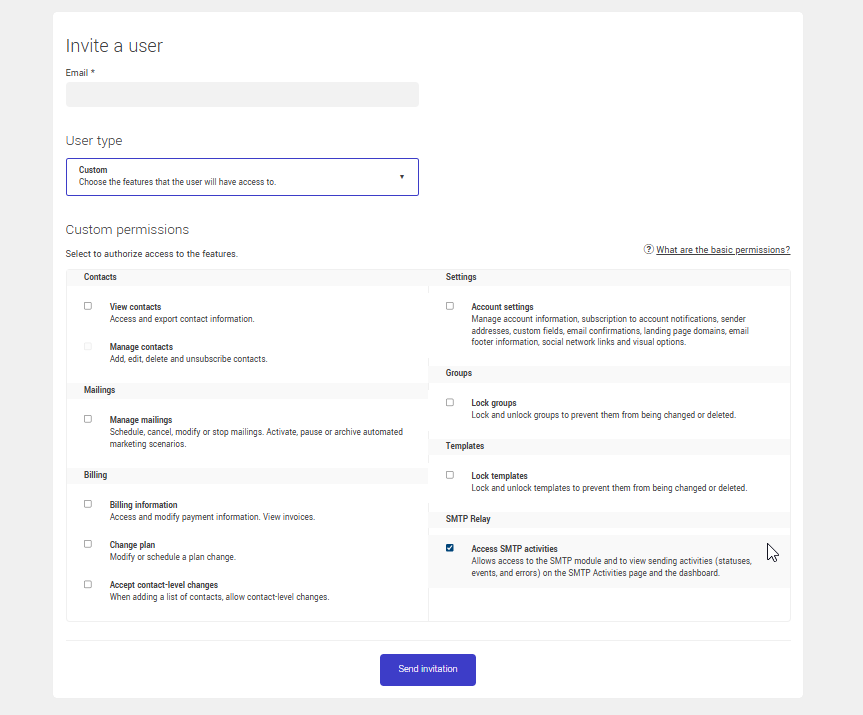
- Click Send invitation. The user will receive an email invitation to join the account.
Tips and tricks
The SMTP section is visible but you can no longer make changes
This indicates that the SMTP plan has expired. The interface switches to read-only mode until renewal or the selection of a new plan.
Intentional limited access
If you want a team member to be able to view sending activity without being able to modify domains or settings, grant them only the Access SMTP activities permission. They will be able to see statistics and activity, without access to configurations.
See also: