
The SMTP section of your Cyberimpact account gives you access to various statistics to track the performance of your mailings. This article explains where to find this information and how to interpret it.
What it's used for
Viewing statistics allows you to:
- Get a quick overview of the state of your mailings
- Monitor your usage against your monthly quota
- Identify a delivery issue on a specific domain
- Track the evolution of bounces over time
Where to find statistics
Statistics are available in two places in the SMTP section:
The dashboard presents an overview of your mailing performance for the selected period (last 7 days by default). You can adjust the period using the date selector: Today, Yesterday, Last 7 days, Last 30 days, or a custom range.
It displays:
- Performance indicators: total recipients, delivery rate, soft bounce rate, and hard bounce rate, each accompanied by the rate of change compared to the previous period of the same length
- An activity chart to visualize the evolution of your mailings over time (number of recipients, delivered emails, soft bounces, and hard bounces), in New or Cumulative view
- The list of your validated domains with their cumulative statistics: recipients sent, emails delivered, number of soft bounces and hard bounces
- The last 10 email activities for a quick glance at your recent mailings, including: date and time of the activity, its status, the recipient's address, the email subject, and the sender address used
The Domains tab
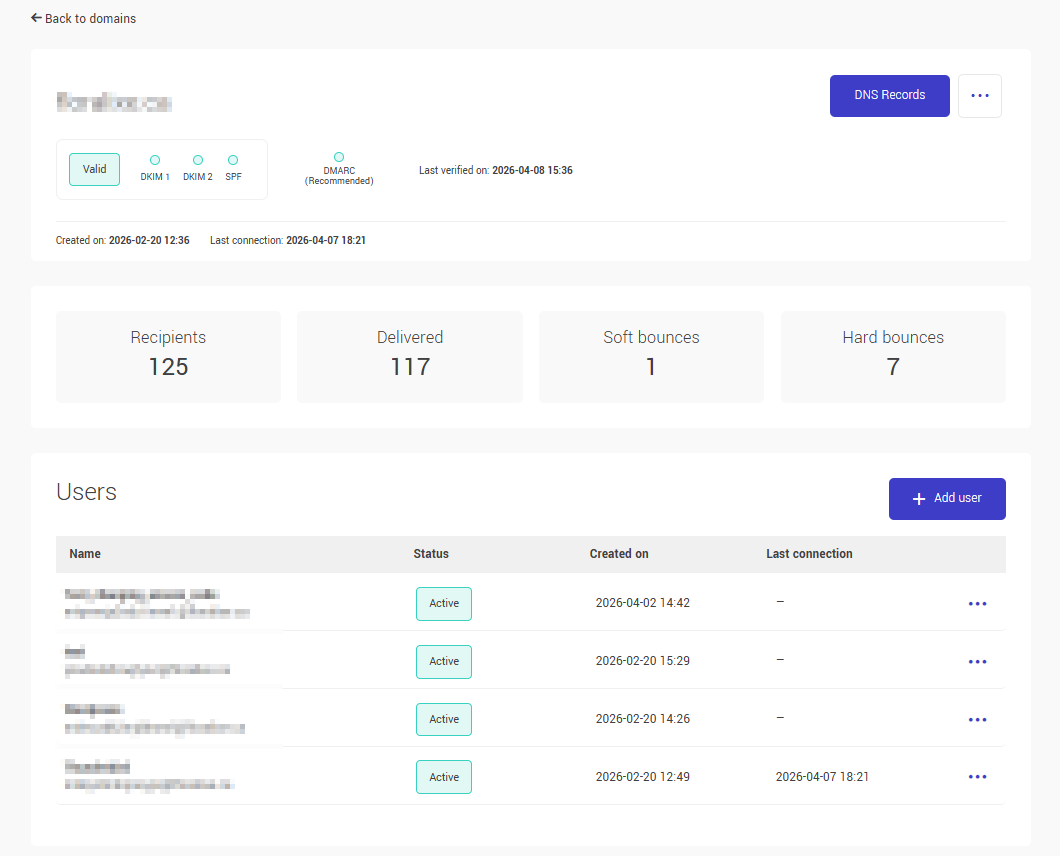
Each configured domain displays its own mailing statistics. In the domain list, you can see the number of recipients, emails delivered, and total bounces (soft and hard combined). By opening a domain's page, you can access the details: soft bounces and hard bounces displayed separately.
Tracking your monthly quota
A monthly quota progress bar is visible at the top of all pages in the SMTP section. Its color indicates your consumption level:
- Blue: 80% or less of the quota used
- Orange: more than 80% of the quota used
- Red: quota reached at 100% (mailings are blocked)
Learn more about the monthly quota >
How statistics are calculated
Statistics are calculated per recipient, not per message. An email sent to 3 recipients counts as 3 in the statistics and in the email volume sent.
See also: